
QR-bills in one minute. The rest takes care of itself.
Quotes, invoices, receipts and banking for Swiss freelancers and SMEs. No bookkeeping knowledge needed: Yoda Bill reads, files and reconciles for you, and gets the year ready for your accountant.
The demo opens without sign-up, with a sample company and sample invoices.
- No subscription
- Data hosted in Switzerland
- English, French, German, Italian
Rue de Genève 17
1003 Lausanne
| Discovery workshop | 850.00 |
| Logo design | 2’400.00 |
| Brand guidelines | 1’200.00 |
- Total excl. VAT
- 4’450.00
- VAT 8.1 %
- 360.45
- Total
- CHF 4’810.45
Atelier Lumen Sàrl
Rue de Genève 17
1003 Lausanne Reference00 00000 00010 42220 26000 04240 Additional informationInvoice F-2026-0042
Create and send an invoice in a few clicks.
The real software, on film: pick the customer, add your items, send. The QR‑bill is attached automatically.

- A new invoice in one click.
- A few letters are enough to find the customer.
- The total and VAT are calculated for you.
- It goes out by e‑mail, with the PDF.
- The QR‑bill is generated automatically.
- Sent. Yoda Bill follows it through to payment.
From quote to payment, with nothing forgotten.
A routine invoice takes less than a minute: customer, items, VAT and due date fill themselves in. Then Yoda Bill follows every document through to payment.
- Sent
The quote
Build it from your items and send it as a PDF. Once accepted, it becomes an invoice in one click.
- To pay
The QR-bill
Sent by e-mail or printed for the post, with the QR payment part ready to scan.
- Reminder 1
The reminder
Overdue invoices show up in your “To do” list. The reminder carries over the balance and fees, with nothing to retype, and can go out on its own.
- Paid
The payment
Record the payment or import your bank statement: the reference finds the right invoice.
The QR-bill, without a second thought.
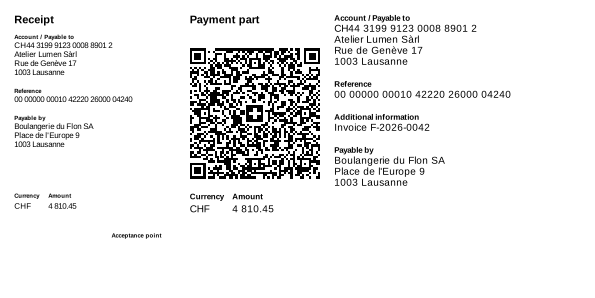
The orange and red payment slips disappeared on 30 September 2022. Every Yoda Bill invoice carries a QR payment part that your customers scan with their banking app.
-
Your usual account will do
QR-IBAN or ordinary IBAN: Yoda Bill recognises your account and puts the right reference on every invoice.
-
One reference per invoice
Import your bank statement: each payment finds its invoice through its reference.
-
CHF or EUR
The amount and currency are in the code: your customer has nothing to copy.
-
Structured addresses
Your details and your customer’s are carried over in the structured format required by the Swiss standard.
Your receipts, in order before year-end closing.
Till receipts, supplier invoices, statements: all in one place, sorted by financial year, ready for your accountant.
-
Photographed on your phone
Take a photo of the receipt at the till, or drag your PDFs in from your computer.
-
Read and filed for you
Type, supplier, date, amount and VAT are recognised, and the category follows your habits. You check at a glance.
-
Nothing forgotten
Your suppliers’ invoices wait under “To pay” with their due date, and Yoda Bill tells you when a regular invoice is missing.
-
Shared with your accountant
Send a link to the financial year: your accountant views and downloads everything, without creating an account.
Suggested by the analysis
- Supplier
- Papeterie du Centre
- Date
- 12.10.2026
- Amount
- CHF 84.50
- VAT
- 6.33 (8.1 %)
- Folder
- Purchases, financial year 2026
Your bank statement does the matching.
Import your bank statement: Yoda Bill links each transaction to its invoice or receipt. You only look at what remains uncertain.
-
Your customers’ payments
Each paid invoice is marked as paid, even when a customer settles several at once or pays part of one.
-
Your expenses, backed up
Each debit finds its receipt or supplier invoice. Bank charges and transfers between your accounts are recognised on their own.
-
Missing receipts
A payment without a receipt? Yoda Bill flags it, so your records are complete at year-end.
- 02.10 Atelier Dubois Sàrl +1’240.00 Invoice 2026-041 paid
- 07.10 Mobile Plus SA −69.90 Receipt found
- 09.10 Account fee −5.00 Bank charges
- 14.10 Garage du Lac −312.40 Receipt missing
- 21.10 Menuiserie Favre +2’480.00 2 invoices paid
4 transactions linked automatically, 1 to complete
Your year at a glance.
Income, expenses and profit are worked out as you go. At year-end, everything is ready for your accountant.
-
Income, expenses, profit
Compared with the year before, with your main customers and what costs you the most.
-
The VAT to pay
Estimated as you go, according to your method: no nasty surprise when the return is due.
-
Year-end, prepared
A list of what is left to do, a simplified profit and loss and a complete file for your accountant.
- Income
- 84’200
- Expenses
- 31’650
- Profit
- 52’550
- +12 % on 2025
VAT to pay (estimate)CHF 5’220
Where the money goes
And everything you expect from good software.
-
Recurring invoices
Subscriptions, rents or flat fees invoiced every month, and sent automatically if you wish.
-
Four languages
Documents and emails in English, French, German or Italian, depending on the customer.
-
In your colours
Your logo, your texts and your email templates. Attach a PDF to an invoice when needed.
-
As a team
Invite a partner or your accountant with the right access. Several companies in one account.
-
Exports
Your lists in Excel or CSV, and all the PDFs of a period in one file.
-
On your phone
Photograph a receipt, find an invoice, record a payment or send a reminder.
You pay for the invoices you send. Nothing else.
No subscription, no commitment. Every month, the first 2 invoices are free, then CHF 1.50 per invoice, never more than CHF 49.– a month.
How many invoices do you send per month?
Quotes and reminders do not count.
- Quotes and reminders free and unlimited
- No card needed for the 2 free invoices
- Stop whenever you like
- Your documents stay yours, whatever happens
- No price increase without 60 days’ notice
Frequently asked questions
Another question? Write to us
Do I need a card to get started?
No. The demo and the 2 free invoices each month need no card. You will be asked for a credit or debit card (or TWINT) only to send more than 2 invoices in a month.
Does Yoda Bill handle VAT?
Yes. The current Swiss rates are offered on every line, with prices excluding or including VAT, and the summary per rate appears on the invoice. If your company is not VAT-registered, VAT disappears from your documents. The VAT return is still prepared by you or your accountant.
Do I need a QR-IBAN?
No. With an ordinary IBAN, your invoices carry a creditor reference (RF); with a QR-IBAN, a QR reference. Either way, your customers scan and pay in the same way.
Where is my data hosted?
Your data is hosted in a data centre in Switzerland. The automatic reading of receipts is done by Anthropic, in the United States. The list of our processors is given in the privacy policy.
Can I stop whenever I want?
Yes. There is no subscription and no minimum term: a month without any invoice sent costs nothing. You can delete your account from your settings; download your documents first, as the law requires you to keep them for ten years.
How do my customers receive their invoices?
By e-mail, with the invoice as a PDF and the QR payment part on the last page. You can also print it and send it by post: the layout fits window envelopes.
Who is behind Yoda Bill?
Yoda Bill is designed, developed and hosted in Switzerland by LEC Group Sàrl. Christophe builds the software, Karen-Saïda answers your questions. No middlemen: you talk directly to the people who make Yoda Bill.
Write to us
Christophe Leuenberger
Founder and CEO
Passionate about software development for over 15 years, he created Yoda Bill and co-founded Bordero.ch.

Karen-Saïda Leuenberger
Administration · Customer relations
Warm and always in a good mood, she enjoys talking with customers as much as travelling.
Try it with a sample invoice.
The demo comes with a fictitious company, customers, quotes and invoices in every state. Nothing to install, nothing to fill in.